Zoomster Action Game: Play the Ultimate High-Octane Thrill
Recently
48 MB
V 1.3.4
All Androids, iOS and PCs
3K Plus

Description
Many people are bored when they have done their job and come back home. It’s the best time to play a game on mobile without any extra effort. Zoomster is helpful in such a situation where you can play a game in a short session of time. It keeps players active and makes every moment feel interesting.
Quick movements, challenging situations, enemies, and different gameplay tasks are making this app one of the top choices for users. In this application you can play multiple stages and levels. Each new level and stage is creating more difficulty for users to play. You can try Zig Zag Gate to have more fun.
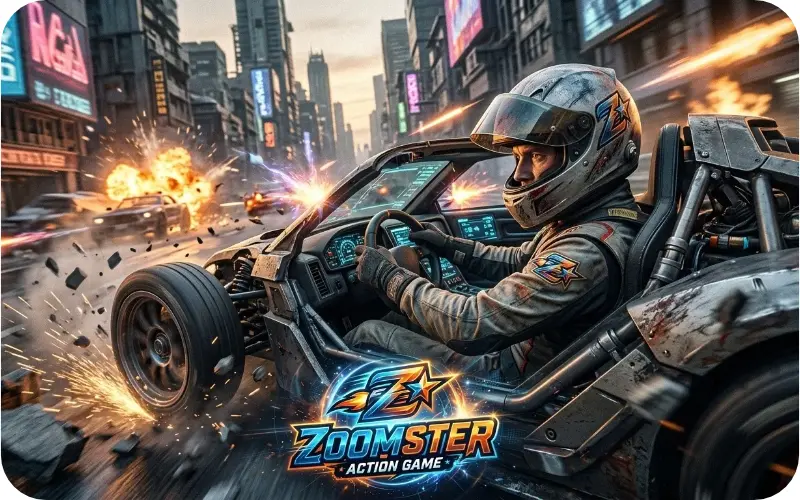
If you are searching for information about Zoomster, then the following guide is special for you. In this guide you are going to know about the features, downloading, and tips of the game.
What Is Zoomster?
Zoomster has a monster-based action concept that gives it a different identity. Its central idea revolves around fighting monsters and protecting Earth, which may attract players who enjoy adventure and fantasy-based battles. It is an action game that has been associated with monster-fighting gameplay.
Here you need to face the enemies and join different action challenges. Your skills and timing strategy matter to score big in the game. The main attraction of this type of game is the combination of quick decisions and player control. You need to pay attention while moving the character.
Try to catch each and leave each character in time. This game can be fun for those who want simple mobile games. Being small in size helps the low-end device player to be easily able to play the game. No skill, experience, or any type of degree is required to play the game.
Unique Features of Zoomster Action Game
A good type of game needs to provide good features for its user. So here are the best and most engaging features that users like:
1. Action-Based Gameplay
The main attraction is its action-based theme and game layout. It can be fun for those types of people who enjoy fast-paced games. Stay focused and respond quickly and on time.
2. Challenging Situations
Action games become more interesting when players face different types of challenges. So it offers several challenges or stages.
Each upcoming new stage comes with a new design layout and challenges.
3. Simple Learning Experience
Beginners want to play this type of game, which doesn’t have any type of complicated interfaces.
The new player feels familiar while operating this gaming application.
4. Entertainment During Free Time
No matter how short the time you have, you can easily play it. This game is best to choose, especially in free time.
You can play when you have free time instead of making gaming a full-day activity.
5. Focus and Quick Decisions
These features make the users more entertaining and bring them more challenges.
You may need to decide when to move, when to attack, and how to respond to an enemy.
How to Download Zoomster
Before downloading Zoomster, first confirm which version you want to play. The simple download method of this gaming application is very simple.
Follow these general steps:
Step 1: Find the Original Game Page
Search for Zoomster in the Play Store.
Step 2: Check Device Compatibility
Read the system requirements before downloading anything. Make sure that your device supports it.
Step 3: Check the Download Option
No click on the install button, and make sure to stabilize your internet connection.
Do not download random files from unknown websites.
Step 4: Install the Game
Allow media storage for smoother installations.
Step 5: Open the Game
After installation, the app is totally ready to use. So open the app and enjoy it in your daily life.

How to Play Zoomster
If you are new, then follow the following few simple steps.
Step 1: Understand the Main Menu
When you open the game, first spend little time by understanding the menu and interfaces of the game.
Step 2: Learn the Controls
Now you need to learn and remember where the control button is located. Try to fully memorize each control button, which makes it easy to play.
Step 3: Start With the Basic Challenges
Avoid rushing into difficult gameplay before understanding the controls. Start slowly and then jump into big challenges.
Step 4: Watch Enemy Movement
If the gameplay involves fighting monsters, pay attention to their movements. Try to focus on each and every movement of characters and objects.
Step 5: Improve Your Timing
Good timing matters more in the game, and avoid pressing controls randomly. Learn the timing of the gameplay.
Powerful Tips to Improve Your Gameplay
Practical tips to make your gameplay smoother:
- Learn each control button.
- Avoid rushing; randomly try to play with strategy.
- Try to keep your device ready for playing.
- Use a comfortable screen position.
- Go to your game setting and adjust the sound system.
- Take small breaks; regular playing can be dangerous.
Best Devices for Playing Action Games
Your device can make a difference in your gameplay.
Here are some common options:
Android Phones: Convenient for this game. Choose a device with enough RAM and storage.
iPhone: This device offers a smooth gaming experience for its users.
Windows PC: It’s well suited for those people who want to play games while operating a keyboard.
Laptop: A practical option for players who want to enjoy computer games without buying a separate desktop.
Zoomster Game Pros and Cons
Here are some pros and cons of this gaming application:
Pros
• Action-based entertainment.
• Quick game and action-based games.
• Best app to time pass.
• Encourages attention and quick decisions.
• Similar to the monster game.
Cons
• Official device compatibility needs confirmation.
• Simple type game.
• Internet requirements may depend on the version.
Final Thoughts
The Zoomster Action Game may interest players who enjoy action-based challenges and monster-themed gameplay. It’s a time-pass app where many users come and enjoy different applications. Overall, you can enjoy a full action game just on your smartphone or PC. The gameplay, controls, available challenges, and game design are so fantastic.
Frequently Asked Questions (FAQs)
What is the Zoomster Action Game?
It’s is an action game that offers several challenges and modes.
Is this app is free to play?
Yes, currently this game is free to play. You don’t need to pay for anyone just to play this game.
Does it require registration?
No registration is required for this app.
Can beginners play this application?
Yes, beginners can easily play this game because it has simple user interfaces.
Can I play this game on a PC?
Yes, you can easily play this game online on a PC.