
Arc Player Download Free | Play All Format of Files
Recently
110 MB
V 1.3.4
All Androids, iOS and PCs
2000+

Description
Imagine you download a file, a video, and any footage. After a while you want to watch it, and you click on the video, but the video doesn’t play. For this problem there are also many apps; the day also Arc Player is one of those.
ARC Player is an app designed for people who want to play compatible internet television and video playlists on supported devices. Users are organizing streaming sources and browsing available programs in this app. The important thing is that this app is designed by a television channel or any other big organization.
The following guide is all about Arc Player. I have tried to explain how this app works, its features, and the download and installation process. You can also enjoy Bottle Flip Unblocked.
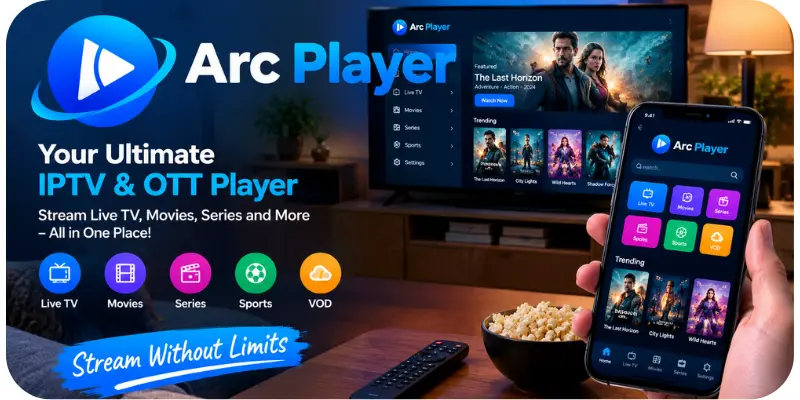
What Is Arc Player, Really?
You can say Arc Player is an app that is helpful to play/open such types of videos that are in video format. This app doesn’t sell or share any video or audio. Users only come to this app to watch those videos that already exist in their gallery.
You will find two versions of this platform. In the video version, this app plays audio/video from your phone, but in the IPTV version, it plays lists. These formats contain information that a media player can use to locate and organize streaming content.
First, a Quick Clarification
Before trying, here is a quick clarification so take a look at it:
1. Arc Player (Video Player version). The Arc Player is basically a video player app. In this app users are playing their videos, which are saved in their phone memory. It helps to play the video. The designer or maker of the player is Arc Tech Limited.
2. ARC Player (IPTV / OTT version). You can call the ARC Player app a streaming app because it is used for streaming lists. You add your own playlist (like M3U or M3U8), and the app organizes it for you. No matter if you have a phone, tablet, or TV, this app works on all types of devices.
Main Features of the Video Player Version
Here is what people prefer this app to use.
Plays many video formats
The app claims that it can easily play all types of videos. You don’t need to worry about file types like MKV, AVI, or MP4.
Automatic video library
The best feature of this app is that it can automatically put your file in one place. You don’t need to manually make files or lists.
Pop-up (floating) window
You can keep a small video window on screen while you use other apps. This feature is handy if you want to watch a lecture while taking notes.
Background play
This app supports background play when the screen is off. This app didn’t let the video/audio stop. In podcasts, interviews, or music videos, background play mode can be helpful.
HD and high-quality playback
Arc players mention smooth playback for HD and 4K videos. Determine whether your device is capable of running 4K videos.
Gesture controls
Most video players of this type let you swipe left to audio up and right to brightness up. It feels natural once you try it.
Who Should Use Arc Player?
Arc Player fits a few types of people.
- Multiple downloaded videos. If your files come from different sources/format and the default player keeps failing.
- Students. The pop-up window and background play are useful for recorded classes.
- People who travel. You can easily download offline videos, so download videos before traveling.
- Users with their own legal IPTV subscription. If your provider gave you a playlist, the IPTV version is a clean way to organize it.
- Anyone who wants a simple, lightweight app. This app is very light in size and space, so you can easily download it.
What You Need Before Using ARC Player
Before installing the application, make sure you understand the basic requirements.
A compatible device: Your device must support the version of ARC Player you intend to install.
An internet connection: This player needs a high-speed internet connection. So try to provide a high-speed internet connection to the devices while using the app.
Permission to access the content: Use playlists from a legitimate source that is authorized to distribute the material.
A little setup time: Users need to give the playlist name and playlist link before trying the app.
How to Download Arc Player (Step by Step)
Here are all the tips to download this player.
On Android
- Open the Google Play Store.
- Type Arc Player in the search bar.
- Look at the results. Check the icon, the developer name, and the description.
- Click the download button.
- After completing the download, the app automatically starts installing.
- Wait for it to finish, then tap Open.
- Allow the storage or media permission to fully activate the app.
On iPhone or iPad
Its very simple to download on iPhone or iPad:
1. Open the App Store.
2. Search for Arc Player.
3. Pick the right one (video player or IPTV).
4. Tap Get, then confirm with Face ID, Touch ID, or your password.
5. Open the app and allow access to your media.
On PC or Mac
The usual method is to use an Android emulator such as BlueStacks, LDPlayer, or MEmu.
- Download the emulator from its official website/trusted source.
- Install it and sign in to Google.
- Open Google Play.
- Search for Arc Player and install it.
- After that the app is ready to use.
How to Use Arc Player (Quick Start)
Video Player Version
- First of all, open the app and allow permission.
- Wait for a few seconds.
- Now click on any video.
- Try the pop-up mode from the player menu.
- Check settings for background play, subtitles, and gestures.
IPTV Version
- Open the app on your devices.
- Now you need to add a playlist, so choose the add playlist option.
- Enter the playlist link or file given by your provider.
- Wait a few seconds to load a channel.
- Add your favorite channel to the favorite list.
Tips to Get a Better Experience
The following are the best and most engaging tips to get a better experience:
• Keep your phone/device updated to get a smoother experience. Old system versions cause playback problems.
• Low storage makes the video player lag and glitch. Try to delete those files that are not in your daily use.
• If a video lags, many players let you switch between hardware and software decoding.
• Always use Wi-Fi; don’t try mobile data. A Wi-Fi internet connection is far better than a data internet connection.
• Close extra apps. This frees memory for smoother playback.
• Rename subtitle files. If a subtitle doesn’t load automatically, give it the same name as the video file.
Pros and Cons of Arc Player
| Pros | Cons |
| Free to use the app. | Two apps sharing one name can create confusion among people. |
| You will find simple use interfaces. | Some features of this app are paid. |
| It can easily operate different types of file formats. | You will find ads if you are using the free version. |
| Small in size. | Your quality of streams depends on your internet speed. |
Final Thoughts
ARC Player is best understood as a tool for organizing and playing compatible streaming playlists, not as a service that supplies entertainment by itself. It is also useful for those people who want to play video offline.
Start with the official download page, check compatibility, and test the setup using a legitimate source. That will help you decide whether ARC Player fits your needs without unnecessary confusion or expense.
FAQs
Is Arc Player free?
You can install it for free, but to enjoy all features, the paid version is available.
Does Arc Player work offline?
Yes, users are able to download videos and often watch them when they get offline.
Can I use it on a smart TV?
The IPTV version is available to play this player on TVs.
Which Arc Player should I pick?
Because you can easily play all formats of videos/audios.
Download links
How to install Arc Player V 1.3.4 Download Free | Play All Format of Files APK?
1. Tap the downloaded Arc Player V 1.3.4 Download Free | Play All Format of Files APK file.
2. Touch install.
3. Follow the steps on the screen.